


SailFlow: Marine Forecasts
4.8263.00 Reviews
App Specs
- Version
- 5.0
- Updated On
- License
- Free
- Downloads
- 100,000+
- Developer
- WeatherFlow
- Categories
- Weather
- Platform
- Android
Screenshots
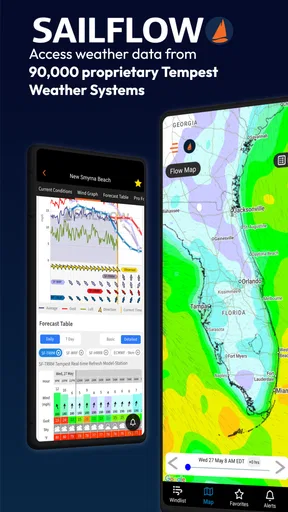
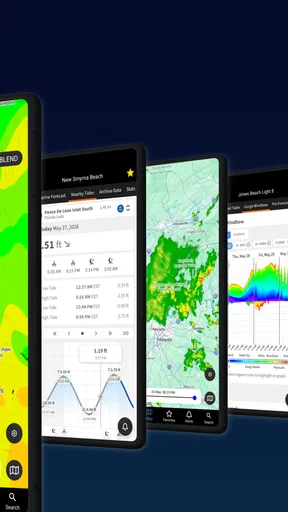
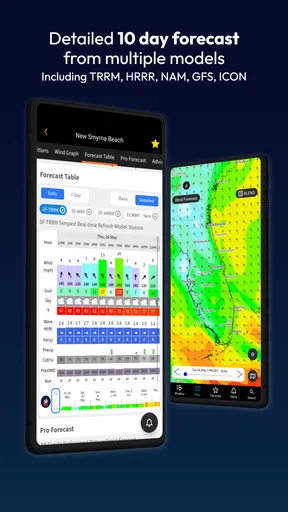
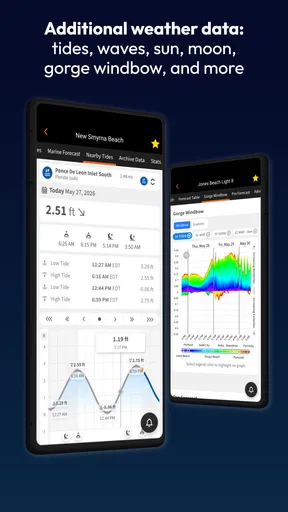
 Analysis by AppCompare
Before deciding whether a marine weather app deserves a regular place on my phone, I ask a practical question: will I still open it after the first burst of curiosity, and will it help me make better choices on an ordinary day afloat? SailFlow: Marine Forecasts is aimed squarely at sailors and boaters who want wind, tides, and waves in one weather-focused tool. Its appeal is clearest when conditions matter to a plan, rather than when I simply want to know whether to take an umbrella.
That focus also sets expectations. A specialized marine forecast can offer a more relevant starting point than a general weather app, but it should support—not replace—local knowledge and judgment. I would use SailFlow to compare conditions and think through a trip, not treat any forecast as a guarantee once I leave shore.
The first week: useful detail, if you know what you need
At first, I would explore the maps and forecast views before relying on them for a departure decision. A useful habit is to check the same area at different times and compare the picture with what I can observe locally. That helps me learn how to read the information in context instead of treating a color on a map as a complete answer.
The app is most compelling for people who sail or boat often enough to ask marine-specific questions: whether the wind is likely to suit a planned outing, how conditions may change, or whether a forecast deserves a second look. For a casual beach visit or a quick check of tomorrow’s rain, a standard weather app may be simpler and less specialized.
Value that has to earn its place month after month
The lasting value of a forecasting app comes from repeated decisions, not from novelty. I can see SailFlow becoming part of a routine: check the forecast while planning, look again closer to departure, then compare it with conditions on the water. That repeated workflow gives the app a purpose beyond browsing maps for their own sake.
It is especially useful when a plan is flexible. If I have several possible windows for a short outing, marine forecasts and map views can help me decide whether to go early, wait, or choose another day. They cannot make that decision for me, but they can make the trade-offs easier to see. For a fixed commitment, I would still keep a backup plan rather than assume conditions will cooperate.
Price is part of that long-term calculation. SailFlow is free to install, while in-app purchases range from $5.49 to $179.99 per item. I would start with the free experience and decide whether any paid option addresses a real need in my routine. A boater who checks conditions only now and then may have little reason to spend; someone who relies on detailed planning more often may value paid features differently.
Worth Reading Before You Choose

EA SPORTS FC Mobile 26 Is a Bigger Football Game, but It Takes Time

Flipboard Shows What News Apps Must Do Beyond the Feed

Switching to Android Auto Means Rethinking Your Driving Routine

Google Calendar Makes a Crowded Week Easier to Manage

Ludo King Makes the Most of the Minutes Between Plans

Baby Panda World Brings Quick Play to Modern Phones, but Its Game Library Feels Busy
A realistic routine and a few useful habits
Imagine I am considering a weekend sail and the forecast looks inviting when I first check it. Rather than making a yes-or-no call from one glance, I would revisit the area later, compare the forecast with the map, and check whether the expected conditions still fit the boat, crew, and route. If the picture changes, I can adjust the plan before loading up and driving to the marina. That is where a marine tool can save more frustration than a last-minute glance at a general forecast.
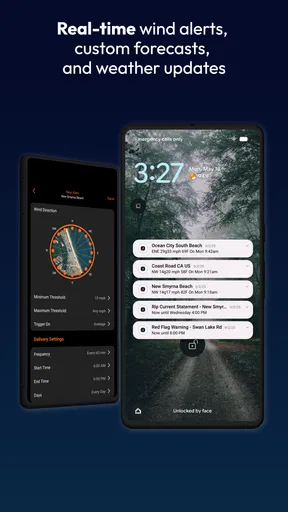
Alerts can support that routine, but I would set them around a decision I actually need to make. Too many notifications quickly become background noise; a carefully chosen alert is more likely to prompt a useful second check. Likewise, maps are most useful when I zoom in on the area relevant to my outing rather than trying to interpret a broad view without a specific question in mind.
One important trade-off is that forecasts and reports are aids, not substitutes for seamanship. Conditions can change, and a forecast that helps with planning does not remove the need to observe the sky, water, and local conditions. I would also keep a second source available for important outings, especially if the weather is unsettled. That is sensible practice with any weather app, not a reason to dismiss this one.
Who will benefit—and who may prefer something else
I would recommend SailFlow to regular sailors and boaters who want weather information framed around time on the water and are willing to check it as part of trip planning. It is less likely to earn a lasting spot for someone who rarely boats, wants only a basic daily forecast, or expects an app to make safety decisions on their behalf.
Compared with a general-purpose weather app, SailFlow’s marine emphasis is the reason to choose it: the subject is boating conditions rather than everyday forecasts for commuting and errands. A general app may be quicker for a broad weather check, while a marine-focused tool makes more sense when wind, tides, and waves are central to the outing. I would keep whichever option answers the question at hand, rather than assume one app must cover every situation.
There is also a practical question about effort. A specialized app rewards users who learn which views and alerts matter to them. If I open it without a plan, the amount of weather information can feel like more than I need; if I arrive with a route or timing decision in mind, the same detail has a clear purpose. That distinction is likely to decide whether it becomes a habit or gets forgotten after the first week.
For anyone wondering whether it is approachable, the best test is to begin with a familiar location and a simple outing, then learn the forecast and map presentation before relying on it for a more demanding trip. And if the question is whether it replaces local observation or another trusted source, my answer is no: it is one useful input in a broader decision, not a promise about what the weather will do.
Ever found yourself out on the water, squinting at the sky, trying to predict whether the wind's going to pick up or calm down? Well, that’s where SailFlow: Marine Forecasts comes in. I’ve been using this nifty app for a while now, and let me tell you, it's like having a seasoned sailor whispering weather secrets in your ear. Whether you’re sailing for leisure or racing against the clock, this app claims to cover all the bases. Let's dive into what makes this app tick.
Features That Stand Out
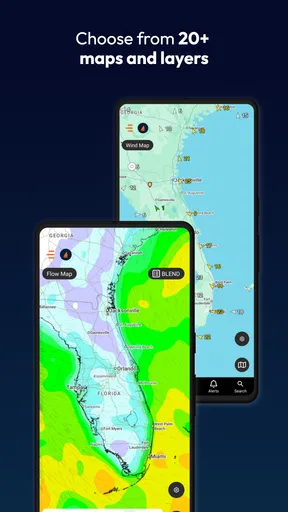
When you first open SailFlow, you're greeted with a clean and intuitive interface. It’s not cluttered with unnecessary frills, which is perfect when you’re trying to get info quickly. The app provides real-time wind reports, forecasts, and interactive weather maps. Trust me, the level of detail in these forecasts is pretty impressive.
Real-Time Wind Reports
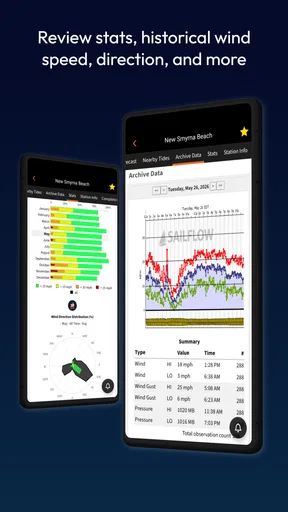
One of the coolest features is the real-time wind reports. You know how unpredictable weather can be, especially when you're out on the water. This app collects data from over 50,000 weather stations worldwide, delivering updates that are as close to real-time as it gets. I found this super helpful, especially when planning a last-minute trip.
Interactive Weather Maps
I’m a visual person, so the interactive weather maps are a big plus for me. You can zoom in and out to see different regions, and the color-coded wind speed indicators make it easy to interpret what’s happening at a glance. I spent more time than I care to admit just playing around with these maps.
Customizable Alerts
Another handy feature is the customizable alerts. You can set them up for specific wind conditions, so you get a nudge when things are about to get interesting. It’s like having a personal weather assistant who knows exactly what you’re interested in.
Community Insights
And if you’re like me, always eager to learn from others, the community insights are a treasure trove. You can see what other sailors are saying about conditions in real-time, which is invaluable when deciding whether to set sail or stay put.
Weather apps are easy to install and just as easy to abandon, so I judge this one by how well it fits a routine. SailFlow is a free weather app from WeatherFlow, released on November 21, 2012. It has a 4.8 average from around 2,000 ratings, and more than 100,000 installs. Those figures suggest a well-used niche tool, but the more important question for me is whether its marine focus answers a recurring need.
The app is rated for Everyone, runs on Android 5.0 or later, and its current version is 5.0. That makes it accessible to a broad range of Android users, while the purchase options mean “free” is best understood as a way to get started, not a promise that every capability is included at no cost. I would check what an upgrade offers before paying, and avoid spending simply because an app presents a premium option.
Why You’ll Love It
What really sets this app apart is its accuracy and reliability. You know how frustrating it is when you get out there, and the weather is nothing like what was forecasted? Well, with SailFlow, I found that the forecasts were spot on more often than not. It’s become my go-to app for planning sailing trips.
Another thing that made me a fan is the app's ease of use. I’m no tech wizard, but navigating through the app feels as intuitive as steering a boat with a gentle breeze. The developers clearly put a lot of thought into the user experience.
What keeps the habit going
For me, a good long-term workflow is more valuable than endlessly checking every available screen. I would choose a few familiar places, use the forecast and maps to answer a specific planning question, and set only alerts that could change what I do. That keeps SailFlow focused on decisions instead of turning it into another stream of notifications.
It is also worth noticing when the app is not the best tool for the moment. If I need a quick, broad forecast for a day on land, my usual weather app is likely faster. If I am planning time afloat, SailFlow’s marine orientation gives it a clearer role. Keeping that distinction in mind makes it easier to judge whether its recurring value justifies the attention and any optional spending.
Room for Improvement
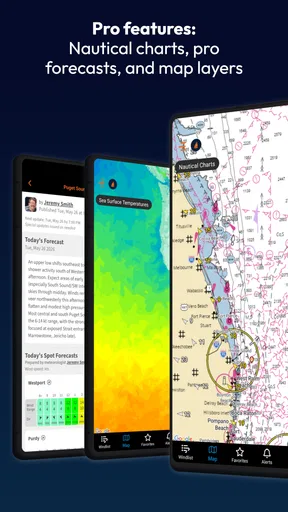
Of course, no app is perfect. While SailFlow is generally reliable, there have been a few times where I wished the updates came a bit faster, especially during rapidly changing weather conditions. Also, while the free version is quite robust, some of the more advanced features are locked behind a paywall. If you’re serious about sailing, the premium version might be worth the investment.
That update concern matters most when conditions are changing quickly. I would not wait for an app alert to tell me what is happening around the boat, and I would avoid treating a recent report as a guarantee that it still describes the situation. The sensible approach is to use the information to prepare and then keep paying attention locally.
The other friction is deciding what deserves attention. Forecasts, maps, alerts, and community observations can each be useful, but checking all of them without a clear question can become a chore. I would start with the forecast and map for the intended area, then consult other views only when they could affect the plan. If that still feels like too much work for occasional outings, a simpler general weather app may suit you better.
Community observations can add helpful context, but I would treat them as one perspective rather than a definitive reading for every location. Conditions vary across an area, and another boater’s experience may not match the stretch of water or timing I care about. The practical benefit is a prompt to look more closely, not permission to skip my own judgment.
Final Thoughts
All in all, SailFlow is a fantastic tool for anyone who spends time on the water. It combines detailed forecasts with real-time updates and a community aspect that’s hard to beat. While there’s always room for improvement, it’s an app that I’d recommend to any sailor, whether you're just starting out or have been navigating the seas for years. So, if you’re looking for a reliable sailing companion, give SailFlow a try. It might just become your new best mate on the water.
My lasting verdict is positive, with a clear condition: SailFlow earns space when marine weather is part of decisions I make regularly. I would try it without paying first, learn the maps and alerts around familiar outings, and judge any purchase by whether it solves a genuine planning need. Occasional boaters may prefer a simpler alternative, while frequent sailors have more reason to make this a habit. Its best role is a practical planning companion, used with common sense and attention to the conditions around me.
Happy sailing!
Pros
- Accurate wind forecasts with real-time updates.
- User-friendly interface for easy navigation.
- Customizable alerts for specific conditions.
- Detailed map with various view options.
- Comprehensive tide and wave data included.
Cons
- Some features require a paid subscription.
- Occasional app crashes reported by users.
- Limited offline functionality available.
- Battery usage can be relatively high.
- Requires consistent internet connection.
FAQs for SailFlow: Marine Forecasts
What features does SailFlow: Marine Forecasts offer?
SailFlow provides detailed marine weather forecasts tailored for sailors and boaters. It includes real-time wind maps, tide charts, and radar information. Users can also access alerts for changing weather conditions and utilize GPS-based tracking for precise navigation. The app supports both local and global forecasts, making it versatile for any sailing adventure.
Is SailFlow available for both Android and iOS?
Yes, SailFlow is available for download on both Android and iOS platforms. Users can easily find it on the Google Play Store and Apple App Store. The app is designed to be user-friendly and offers a consistent experience across different devices, ensuring accessibility for all sailors.
Does SailFlow require an internet connection to function?
While SailFlow can provide some offline capabilities, such as previously downloaded forecasts, an active internet connection is essential for accessing real-time data and updates. This includes live wind maps, radar information, and receiving timely alerts about weather changes, ensuring the most accurate and up-to-date information is available.
Are there any subscription costs or in-app purchases in SailFlow?
SailFlow offers a free version with basic features. However, for advanced functionalities, such as extended forecasts and premium maps, users can opt for a subscription service. The subscription unlocks additional tools and removes ads, providing a more comprehensive and uninterrupted experience for dedicated sailors.
How accurate are the weather forecasts provided by SailFlow?
SailFlow is known for its high accuracy in marine weather forecasting. It utilizes a combination of data from multiple weather stations and satellite feeds to provide precise forecasts. The app frequently updates its information to reflect current conditions, helping sailors make informed decisions while at sea.


